

1 How to activate the link
- Download and install (as administrator) the latest version of IDEA StatiCa
- Make sure that you are using the supported version of STAAD.Pro
To integrate the IDEA StatiCa plugin into STAAD.Pro, open the BIM link installer: under the BIM tab, select Activate your BIM link (1). You may be asked by the operating system to confirm access (2).
Select the Install button (3) next to STAAD.Pro. You should see the "Installed" status now.

To finish the integration, you need to add the plugin to the User tools inside STAAD.Pro as well. Open STAAD.Pro project (you can use the tutorial project).
Under Utilities in the top ribbon, select User Tools - Configure (1). Here, add the plugin as a new user-defined tool (2):
- Menu items (3): IDEA StatiCa
- Command (4): C:\Program Files\IDEA StatiCa\StatiCa 20.1\IDEAStatiCa.vbs
- Initial Directory (5): C:\Program Files\IDEA StatiCa\StatiCa 20.1\

Confirm by OK (6).
The IDEA StatiCa plugin has been added and can be accessed under User Tools now.

Please see the remarks about the limitations of this BIM link.
Bekende beperkingen voor STAAD.Pro
Voor nu werkt de koppeling voor een grote verscheidenheid aan verbindingen/knooppunten. Houd echter rekening met nog niet ondersteunde functionaliteit.
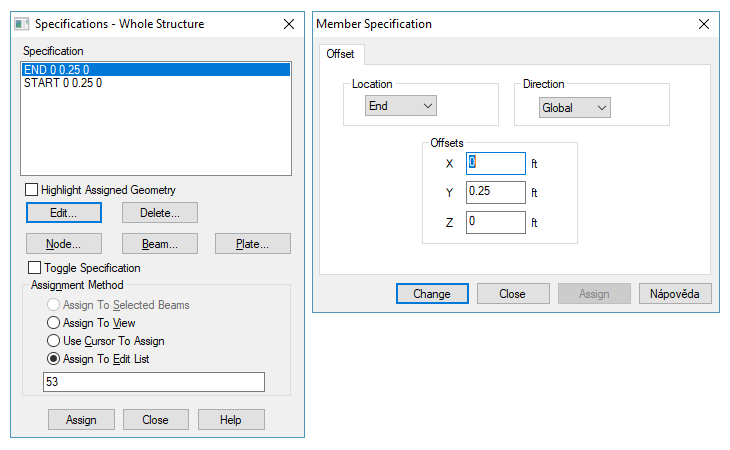
Geometrische excentriciteit
Beperking: Geometrische excentriciteit - verbindingsknoop bevindt zich niet in het middelpunt
Oplossing: Importeer de verbinding en verplaats de staven handmatig naar de juiste posities. De geïmporteerde inwendige krachten bevatten de excentriciteitseffecten; alleen de geometrische offset ontbreekt.

Belastingcombinaties
Beperking: Belastingcombinaties die verwijzen naar andere belastingcombinaties kunnen niet worden geïmporteerd. Deze combinaties worden automatisch overgeslagen tijdens het importeren.
Oplossing: Maak nieuwe belastingcombinaties aan in STAAD.Pro die alleen basisbelastinggevallen bevatten, of pas de bestaande aan zodat ze dezelfde regel volgen.

Beperking: SRSS- en ABS-belastingcombinatiemethoden worden niet ondersteund. Deze speciale combinatiemethoden vereisen niet-algebraïsche wiskundige verwerking.
Omdat Checkbot een strikte algebraïsche sommatie van belastinggevallen uitvoert (inclusief teken), worden SRSS- en ABS-combinaties uitgesloten van import.
Oplossing: Vervang bestaande SRSS- en ABS-combinaties, of maak nieuwe aan, met standaard algebraïsche combinaties die alleen basisbelastinggevallen gebruiken. Deze vereenvoudigde combinaties worden correct geïmporteerd.
