

1 Comment activer le lien
- Téléchargez et installez (en tant qu'administrateur) la dernière version d'IDEA StatiCa
- Assurez-vous d'utiliser la version prise en charge de STAAD.Pro
Pour intégrer le plugin IDEA StatiCa dans STAAD.Pro, ouvrez l'installateur du lien BIM : sous l'onglet BIM, sélectionnez Activate your BIM link (1). Le système d'exploitation peut vous demander de confirmer l'accès (2).
Sélectionnez le bouton Install (3) à côté de STAAD.Pro. Le statut « Installed » devrait maintenant s'afficher.

Pour vérifier que le plugin a bien été installé, ouvrez un projet STAAD.Pro, cliquez sur l'onglet Utilities > User Tools : le bouton IDEA StatiCa Checkbot devrait y être répertorié.

Si IDEA StatiCa Checkbot n'est pas répertorié, vous pouvez ajouter le plugin manuellement :
- Sous Utilities (1) dans le ruban supérieur, sélectionnez Configure (2). Ajoutez ici le plugin en tant que nouvel outil défini par l'utilisateur (3)
- Command (4) : C:\Program Files\IDEA StatiCa\StatiCa 25.0\IdeaStaadProPlugin.exe
- Initial Directory (5) : C:\Program Files\IDEA StatiCa\StatiCa 25.0\

Confirmez par OK (6).
Le plugin IDEA StatiCa a été ajouté et est désormais accessible sous User Tools.
Veuillez consulter les remarques concernant les limitations de ce lien BIM.
Limitations connues pour STAAD.Pro
Pour l'instant, le lien fonctionne pour une grande variété d'assemblages. Cependant, veuillez tenir compte des fonctionnalités non encore prises en charge.
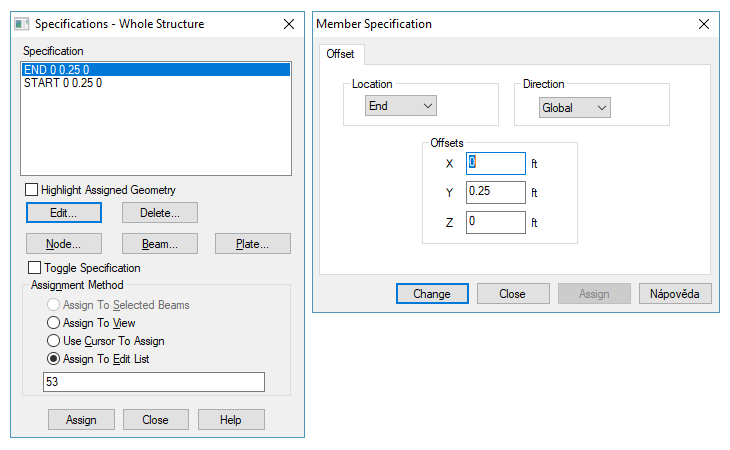
Excentricité géométrique
Limitation : Excentricité géométrique - le nœud d'assemblage n'est pas au point central
Solution de contournement : Importez l'assemblage et déplacez les éléments manuellement vers les positions appropriées. Les efforts intérieurs importés incluent les effets d'excentricité ; seul le décalage géométrique est absent.

Combinaisons de charges
Limitation : Les combinaisons de charges qui font référence à d'autres combinaisons de charges ne peuvent pas être importées. Ces combinaisons sont automatiquement ignorées lors de l'importation.
Solution de contournement : Créez de nouvelles combinaisons de charges dans STAAD.Pro ne contenant que des cas de charge de base, ou modifiez les combinaisons existantes pour respecter la même règle.

Limitation : Les types de combinaisons de charges SRSS et ABS ne sont pas pris en charge. Ces méthodes de combinaison spéciales nécessitent un traitement mathématique non algébrique.
Étant donné que Checkbot effectue une sommation algébrique stricte des cas de charge (signe inclus), les combinaisons SRSS et ABS sont exclues de l'importation.
Solution de contournement : Remplacez les combinaisons SRSS et ABS existantes, ou créez-en de nouvelles, par des combinaisons algébriques standard n'utilisant que des cas de charge de base. Ces combinaisons simplifiées seront importées correctement.
